
Why You Should Learn Regex (Regular Expressions) - It's Not Just for Code
I spent a significant part of my career thinking of regular expressions as tools only for complex pattern matching in code. I avoided using them for a long time due to the perceived complexity. It’s true that the syntax can be a little difficult to understand. I now know how helpful they are for tasks that support writing code. It only took learning the basics to significantly boost my productivity and reduce the time it takes for me to complete certain tasks. I now use them regularly for the massive productivity boost they can provide.
Instead of spending an hour or two writing a throwaway script or utility, you can often solve the problem with RegEx in just a couple of minutes.
I use the terms Regular Expressions and RegEx interchangeably throughout this post to refer to Regular Expressions.
This example uses the MySQL Sakila database and MySQL Workbench version 8.0.36.
One example that I use on a very regular basis is formatting data copied from a database management tool, like SSMS or MySQL Workbench, to be used in a SQL IN operator.
In the following screenshot, I’ve run the query SELECT category_id FROM sakila.category where name <> 'New' on the MySQL Sakila categories table to get every category except where the name column does not equal “New”, limiting the results to just the category_id column.
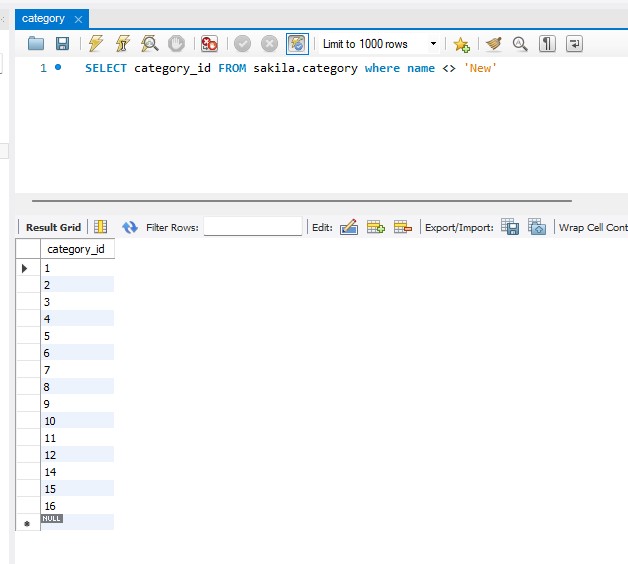
Category table query results
I can highlight the category_id values returned from the search, right click and select copy row.
Then I use the File > New Query tab to open a new tab and run the following query to get film data joined with film_category data.
select * from film f
join film_category fc
on f.film_id = fc.film_id
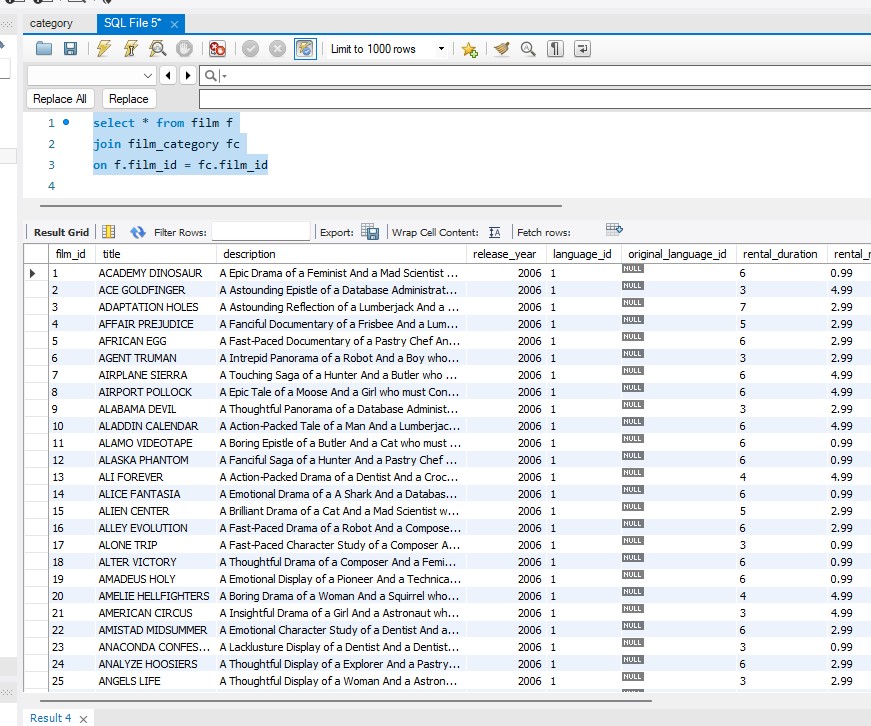
Film table joined to film_category table
Now I want to get the results back, limited by the category_id column values I copied earlier. I’ll paste those values into the join query tab and add where fc.category_Id in to the query.
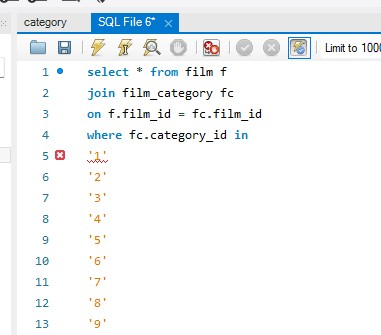
IN added to query
There is a query syntax error because the data for the IN operator isn’t formatted correctly. MySQL Workbench helpfully added single quotes to the copied data, but we still need parentheses at the beginning and end and commas between each value. This list is short and would be easy to edit by hand, but there are situations exactly like this where you may have hundreds of values you need to add to the IN clause.
A note on query length: Most database engines specify a maximum length for queries. While the example used here is fine and indicative of common, ad-hoc operational queries. Adding hundreds or thousands of values to an IN clause is a common way to cause the query to exceed the length of the database engine.
I need to format the data. I can add the parentheses at the beginning and end easily enough. For the sake of example, I’m going to use a regular expression to add the commas.
First, I’ll highlight the data I want to edit and then click Ctrl + H to open the Find/Replace tool. In the drop down next to the search icon, there is a “Regular Expression” option.
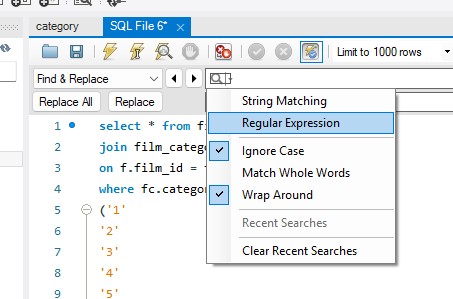
Regular Expression option in search drop-down
I’ll click the “Regular Expression” option to activate regular expressions.
Normally, in a case like this, I would just use \n in the find box and \n, in the replace box to find all occurrences of a newline character and replace them with a newline character followed by a comma. MySQL Workbench doesn’t seem to support newlines in a RegEx search, so I’ll have to use a different approach. Fortunately, there is another option.
In the search box, I can search for '$. That’s a single quote followed by a $. The single quote is a string literal and the $ is a matching character in RegEx that typically matches to the end-of-line or end-of-string, depending on the RegEx flavor and multiline settings. So, what '$ does is find a single quote followed by the end of input, in this case a line break. Whether this works in your editor will depend on the type of Regular Expression engine the editor is using and whether it is configured. That is outside of the scope of this document, but worth being aware of.
I can now put ', in the replace box and click the Replace All button. The find/replace adds a comma every occurrence of a single quote at the end of a line. The syntax for the query is now correct. The query executes and returns data filtered by the IN operator.
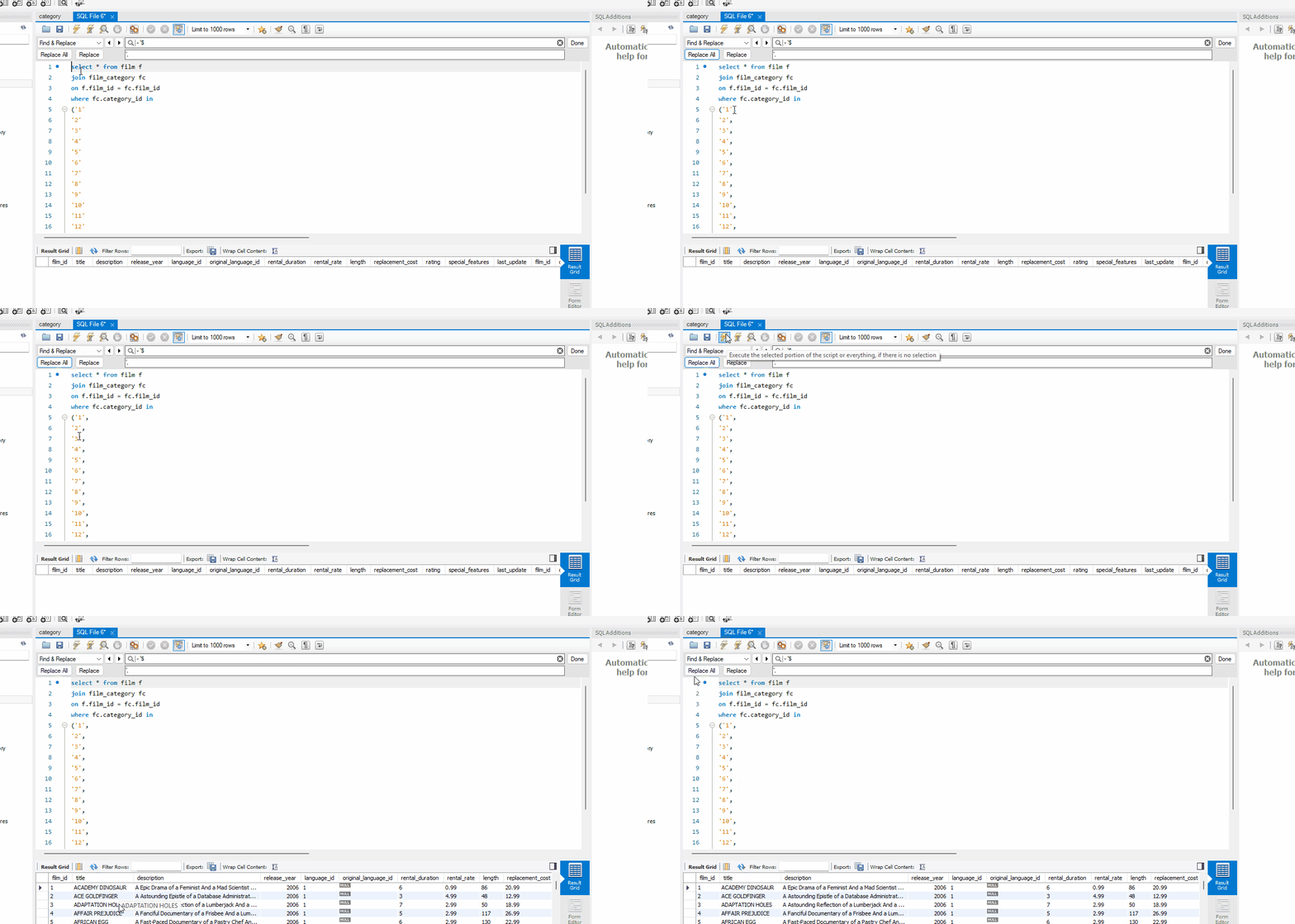
Find and replace using regex
Sometimes, instead of doing this type of find/replace using RegEx directly in a tool like MySQL Workbench, I’ll copy the data to a text editor or IDE instead. Different tools provide better support for RegEx queries. The newline issue I ran into with MySQL Workbench is a good example. Also, if your text editor or IDE supports recording macros, you can create some very powerful utility macros using RegEx.
Now that we’ve looked at some examples of what regular expressions are good for, I do want to address using regular expressions in code.
Many developers are familiar with the famous quote from Jamie Zawinski about regular expressions from 1997:
Some people, when confronted with a problem, think “I know, I’ll use regular expressions.” Now they have two problems.
There is some truth to this. Using regular expressions in code can be problematic if not done wisely. This post isn’t about using regular expressions in code, but I will state the following about doing so:
- Always clearly document what a regular expression does, either with a comment, or preferably, by wrapping it in a function with a name that clearly documents what the regular expression does.
So, instead of doing this:
// Some C# code here.
// Assume we have a variable called accountNumber that contains a customer's account number.

if (Regex.IsMatch(accountNumber, @"^\d{4}-\d{3}-\d{4}-\d{2}-[A-Z]$"))
{
    // Some more logic here if validation passes.
}
Write something more like this:
// Some C# code here.
// Assume we have a variable called accountNumber that contains a customer's account number.

if (IsValidAccountNumber(accountNumber))
{
    // Some more logic here if validation passes
}

/// <summary>
/// <para>Ensures accountNumber matches pattern 9999-999-9999-99-X</para>
/// <para>Where 9 is any number 0 through 9 and X is any letter A-Z, upper case.</para>
/// </summary>
/// <param name="accountNumber">The account number to verify</param>
/// <returns>bool</returns>
public static bool IsValidAccountNumber(string accountNumber)
{
    return Regex.IsMatch(accountNumber, @"^\d{4}-\d{3}-\d{4}-\d{2}-[A-Z]$");
}
- Use regular expressions sparingly in code and favor library functions for pattern matching when possible.
In the previous example, we’re using an imagined, proprietary account number format. A regular expression makes sense in this case. However, for many common data validation tasks, many modern libraries include built-in functions for common pattern matching scenarios. Examples include date matching, using functions like .NET’s DateTime.TryParse() and PHP’s DateTimeImmutable::createFromFormat(), and parsing numeric values using functions like .NET’s Decimal.TryParse() and Java’s Double.parseDouble(), etc.
Favor whatever is available in your language or its libraries before resorting to using regular expressions in code. However, do use them when they make sense.
A few caveats:
- There are a few different types of regular expression engines, referred to as “flavors”. The syntax between them varies to some degree.
- Make a backup of the original file, or ensure the existence of one, before starting the manipulation phase.
- “Find” and “Undo” are your friends. Work through the regular expression incrementally, periodically using Find to make sure it’s matching what you expect. Use Undo if the replacement didn’t do what you expected it to do.
- If the data to be manipulated is too large or complex, a custom written transformation utility may be a better choice.
I hope this gave you an idea of how powerful regular expressions are and the types of things they can be used for beyond using them in code. This type of text manipulation is where regular expressions really shine, and understanding how they work can pay dividends in the long run.
Once I took the time to learn just the very basics of regular expressions, my productivity improved significantly. If this has inspired you to learn more, I would encourage you to check out the same tutorial I stumbled upon years ago at regular-expression.info , which is still available to this day.