
How to Fix the Entity Framework LINQ Expression Could Not Be Translated Error
When working with Entity Framework, it’s very likely a developer will write code that will eventually produce an error like “LINQ Expression Could Not Be Translated.” The details of the error often look something like the exception shown below:
System.InvalidOperationException: 'The LINQ expression 'DbSet<UserCustomer>()
    .Join(
        inner: DbSet<Customer>(),
        outerKeySelector: u => EF.Property<int?>(u, "CustomerId"),
        innerKeySelector: c => EF.Property<int?>(c, "Id"),
        resultSelector: (o, i) => new TransparentIdentifier<UserCustomer, Customer>(
            Outer = o,
            Inner = i
        ))
    .Where(u => u.Outer.UserId == @userId && u.Inner.IsActive())' could not be translated. Either rewrite the query in a form that can be translated, or switch to client evaluation explicitly by inserting a call to 'AsEnumerable', 'AsAsyncEnumerable', 'ToList', or 'ToListAsync'. See https://go.microsoft.com/fwlink/?linkid=2101038 for more information.'
The example error contains table, column, and function names specific to my test application example, but the key to understanding the error comes from the “could not be translated” part of the error message.
A very short and simplified explanation is that Entity Framework is trying to translate the C# code to SQL code that can be run on the database, but something in the code can’t be translated to SQL. Support for what can be translated has improved significantly with each new version of EF Core, but this is still a common error situation.
To fix the issue, the code that can’t be translated to SQL must be identified and accounted for. Examine your LINQ code for anything that may not directly translate to SQL. You can continue reading about the example application in the next section or jump directly to How to Fix the Exception .
To intentionally reproduce this error and write this post, the following has been set up in a test application. For brevity, I’ve left out the full details of the application, but all of these items are components of a small ASP.NET Core web application using Razor pages.
- A Customers table with
CreateDateandActivecolumns exists in the database.
CREATE TABLE [dbo].[Customers](
	[Id] [int] IDENTITY(1,1) NOT NULL,
	[Name] [varchar](50) NULL,
	[Address] [varchar](250) NULL,
	[City] [varchar](50) NULL,
	[Region] [varchar](50) NULL,
	[PostalCode] [varchar](50) NULL,
	[Country] [varchar](3) NULL,
	[PhoneNumber] [varchar](20) NULL,
	[CreateDate] [datetime] NULL,
	[Active] [bit] NOT NULL,
 CONSTRAINT [PK_Customers] PRIMARY KEY CLUSTERED
(
	[Id] ASC
)WITH (PAD_INDEX = OFF, STATISTICS_NORECOMPUTE = OFF, IGNORE_DUP_KEY = OFF, ALLOW_ROW_LOCKS = ON, ALLOW_PAGE_LOCKS = ON, OPTIMIZE_FOR_SEQUENTIAL_KEY = OFF) ON [PRIMARY]
) ON [PRIMARY]
GO
- A UserCustomers table exists with a foreign key to the Customers table. This table controls which users have access to which customers.
CREATE TABLE [dbo].[UserCustomers](
	[Id] [int] IDENTITY(1,1) NOT NULL,
	[UserId] [nvarchar](450) NOT NULL,
	[CustomerId] [int] NOT NULL,
 CONSTRAINT [PK_UserCustomers] PRIMARY KEY CLUSTERED
(
	[Id] ASC
)WITH (PAD_INDEX = OFF, STATISTICS_NORECOMPUTE = OFF, IGNORE_DUP_KEY = OFF, ALLOW_ROW_LOCKS = ON, ALLOW_PAGE_LOCKS = ON, OPTIMIZE_FOR_SEQUENTIAL_KEY = OFF) ON [PRIMARY]
) ON [PRIMARY]
GO

ALTER TABLE [dbo].[UserCustomers]  WITH CHECK ADD  CONSTRAINT [FK_UserCustomers_Customers] FOREIGN KEY([CustomerId])
REFERENCES [dbo].[Customers] ([Id])
GO

ALTER TABLE [dbo].[UserCustomers] CHECK CONSTRAINT [FK_UserCustomers_Customers]
GO
- A Customer model class exists. Note the
IsActivefunction.
   public class Customer
   {
       public int Id { get; set; }
       public string Name { get; set; }
       public string Address { get; set; }
       public string City { get; set; }
       public string Region { get; set; }
       public string PostalCode { get; set; }
       public string Country { get; set; }
       public string PhoneNumber { get; set; }
       public DateTime? CreateDate { get; set; }
       public bool Active { get; set; }

       public bool IsActive()
       {
           return Active && CreateDate != null;
       }

   }
- A UserCustomer class exists.
    public class UserCustomer
    {
        public int Id { get; set; }
        public string UserId { get; set; }
        public int CustomerId { get; set; }
        public virtual Customer Customer { get; set; }
    }
- The Customers and UserCustomers models are defined in the application’s database context class.
    public class AppDbContext : DbContext
    {
        public DbSet<Customer> Customers { get; set; }
        public DbSet<UserCustomer> Usercustomers { get; set; }

        public AppDbContext(DbContextOptions<AppDbContext> options)
            : base(options) { }
    }
- A CustomerService class exists that handles database I/O for the application. Inside that class is a function called GetActiveCustomers. The issue causing the LINQ translation error is in this function.
    public List<Customer> GetActiveCustomers(string userId)
    {
        return _context.Usercustomers.Where(x => x.UserId == userId && x.Customer.IsActive()).Select(x => x.Customer).ToList();
    }
- The GetActiveCustomers function is called from a razor page when the user navigates to the Customers link in the application.
            // Earlier code not shown establishes the setup needed to call the database using the context.

            var customers = new List<Customer>();
            if (userId != null)
            {
                customers = customerService.GetActiveCustomers(userId);
            }

            CustomerList = customers;
When I debug the application in Visual Studio, and click on the Customer page, an unhandled exception is thrown:
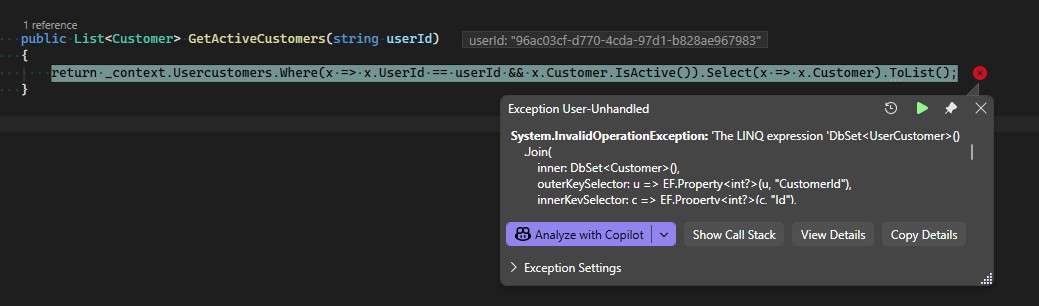
LINQ Expression Could Not Be Translated Exception
In the case of this sample application, the root cause is that the IsActive() function is being called inside the LINQ code that is being translated to SQL. How this translation is done is outside the scope of this post. The bottom line, though, is that Entity Framework Core doesn’t know how to translate this method to a SQL query. To resolve the error, some changes must be made.
The key to fixing the error is given directly in the exception that is thrown by Entity Framework Core. The following statement appears at the end of the exception information: “Either rewrite the query in a form that can be translated, or switch to client evaluation explicitly by inserting a call to 'AsEnumerable', 'AsAsyncEnumerable', 'ToList', or 'ToListAsync'.”
The key statement in that text is “Either rewrite the query in a form that can be translated, or switch to client evaluation explicitly”
That gives us two options: rewrite the query so the SQL can be translated or switch to client evaluation.
This solution requires rewriting the query so that the code that can’t be translated is removed and replaced with code that can be translated. There are a couple of ways to do this, depending on what is actually causing the translation issue. Here’s what the solution looks like rewriting the query for this example application:
        public List<Customer> GetActiveCustomers(string userId)
        {
            return _context.Usercustomers
                                .Where(x => x.UserId == userId && x.Customer.Active && x.Customer.CreateDate !=null)
                                .Select(x => x.Customer).ToList();
        }
In the example, the call to Customer.IsActive() has been removed and replaced with x.Customer.Active && x.Customer.CreateDate !=null. Entity Framework can convert these expressions to SQL and complete the query.
Switching to client evaluation means the code must be written so that Entity Framework runs the query to get the data that can be retrieved and then complete the filtering of the results in memory in the application. To do that, we can add a call to AsEnumerable(). While it’s outside of the scope of this blog post, note that .Include() was also added to handle an issue with lazy vs. eager loading.
    return _context.Usercustomers
                        .Include(x => x.Customer)
                        .Where(x => x.UserId == userId).AsEnumerable()
                        .Where(x => x.Customer.IsActive())
                        .Select(x => x.Customer).ToList();
I’m oversimplifying a little bit here, but the mental model I use is that adding AsEnumerable() changes how EntityFramework decides what parts of the code should run on the database and which parts should run in-memory in the application. Because the code after AsEnumerable now executes in-memory, the .IsActive function is accessible and executes without issue.
While client evaluation can be useful, there is a trade-off. Filtering data in the application means a broader query is being run on the database server. This can result in performance degradation when a large volume of data is being queried. Consider this trade-off when resolving this issue. In some cases, the option of rewriting the query so it can be translated to SQL and run on the database may make more sense.
To better illustrate this, let’s look at the SQL Query that gets generated in each of the two examples.
Here is the SQL Query for the first example, where the code is rewritten so it can be translated to SQL.
DECLARE @userId nvarchar(4000) = N'96ac03cf-d770-4cda-97d1-b828ae967983';

SELECT [c].[Id], [c].[Active], [c].[Address], [c].[City], [c].[Country], [c].[CreateDate], [c].[Name], [c].[PhoneNumber], [c].[PostalCode], [c].[Region]
FROM [Usercustomers] AS [u]
INNER JOIN [Customers] AS [c] ON [u].[CustomerId] = [c].[Id]
WHERE [u].[UserId] = @userId AND [c].[Active] = CAST(1 AS bit) AND [c].[CreateDate] IS NOT NULL
Note the WHERE clause in the above query, which is filtering rows by the UserId, Active, and CreateDate columns.
Here is the SQL query for the second example, which will end up being the part before the call to AsEnumerable().
DECLARE @userId nvarchar(4000) = N'96ac03cf-d770-4cda-97d1-b828ae967983';

SELECT [u].[Id], [u].[CustomerId], [u].[UserId], [c].[Id], [c].[Active], [c].[Address], [c].[City], [c].[Country], [c].[CreateDate], [c].[Name], [c].[PhoneNumber], [c].[PostalCode], [c].[Region]
FROM [Usercustomers] AS [u]
INNER JOIN [Customers] AS [c] ON [u].[CustomerId] = [c].[Id]
WHERE [u].[UserId] = @userId
In this version, the WHERE clause is filtering rows by the UserId column, resulting in more rows being returned from the database.
This section is for anyone still maintaining legacy applications that may be using older versions of Entity Framework. What can be translated to SQL has improved significantly with EF Core, especially the newer versions. In versions of Entity Framework prior to EF Core, however, there are more scenarios where this error can occur. Date/time-based functions are one category that can cause this type of problem in older versions of Entity Framework.
The good news is the resolution is very similar to EF Core. The two choices are to rewrite the query so it can be translated to SQL. Rewriting usually means translating the results of expressions into local variables, then using those local variables in the LINQ query. The other option is adding something like ToArray() or ToList() to return the results in-memory within the application, then following that with the parts of the query that can’t be translated to SQL. The previous section on database vs. in-memory logic still applies as well.