
AWS CCP Exam Prep: Understanding AWS Billing, Pricing and Support - Part 1
One of my goals for 2026 is to pass the AWS CCP exam, and one of my weakest areas of knowledge happens to be the billing, pricing and support services offered by AWS. It makes sense if you think about it. I’m a software developer. I’d rather be learning about servers, queues, Lambda services, APIs, etc. You know, all the things developers find interesting. However, if I want to pass the exam, then I need to take the billing, pricing and support services seriously. Even though this content domain is only weighted at 12% of the score content of the exam, that’s enough to mean the difference between a passing and failing score if I miss too many questions. Additionally, to grow as a software developer, it’s good to go beyond just writing code.
More information on the AWS CCP exam can be found on the AWS Certified Cloud Practitioner certification page.
AWS outlines four exam prep steps , which are:
- Get to know the exam
- Refresh your AWS knowledge and skills
- Review and practice for your exam
- Assess your exam readiness
I see this as a non-linear series of steps. One can go backwards and forwards or repeat steps as needed. I’ve gone through all four of the steps, and while I can sometimes achieve a passing score on practice tests, I don’t believe I can do that consistently enough to pass. So, I’ve gone back to step three to review and practice before I assess my exam readiness again.
The object of this post, and possible follow-up posts, is to solidify my knowledge of the AWS billing, pricing and support services. This is a lot of information to cover, so I might need to cover this in multiple posts.
All examples here use us-east-2 unless otherwise noted.
This post focuses on AWS CCP Exam Task Statement 4.1: Compare AWS pricing models
My last practice test results before writing this series:
- 70% required to pass.
- My Score: 64%
- 42 out of 65 questions correct.
- Result: Failed.
The first Task Statement under the content domain is Task Statement 4.1: Compare AWS Pricing models .
This isn’t my weakest area of the billing, pricing and support content domain, but a little refresher never hurts. So let’s take a look at this section.
The first item listed under the Compare AWS pricing models task in “Compute purchasing options”, such as on-demand instances and reserved instances. Let’s look at each option individually.
The Amazon EC2 On-Demand Pricing page states: “On-Demand Instances let you pay for compute capacity by the hour or second (minimum of 60 seconds) with no long-term commitments.”
These instances are best when you need an EC2 instance with no long-term commitment. Note that the on-demand pricing charges for a minimum of 60 seconds. So, if an EC2 instance with on-demand pricing is created and launched, you are billed for at least 60 seconds from the point where the EC2 instance reaches a running state. This aligns with how Amazon describes the pricing as well, i.e., “from the time an instance is launched until it is terminated or stopped.” The bottom line is, if you are experimenting with EC2 instances using on-demand pricing, use a smaller, less expensive option, and always terminate or stop the on-demand EC2 instance when it is no longer needed.
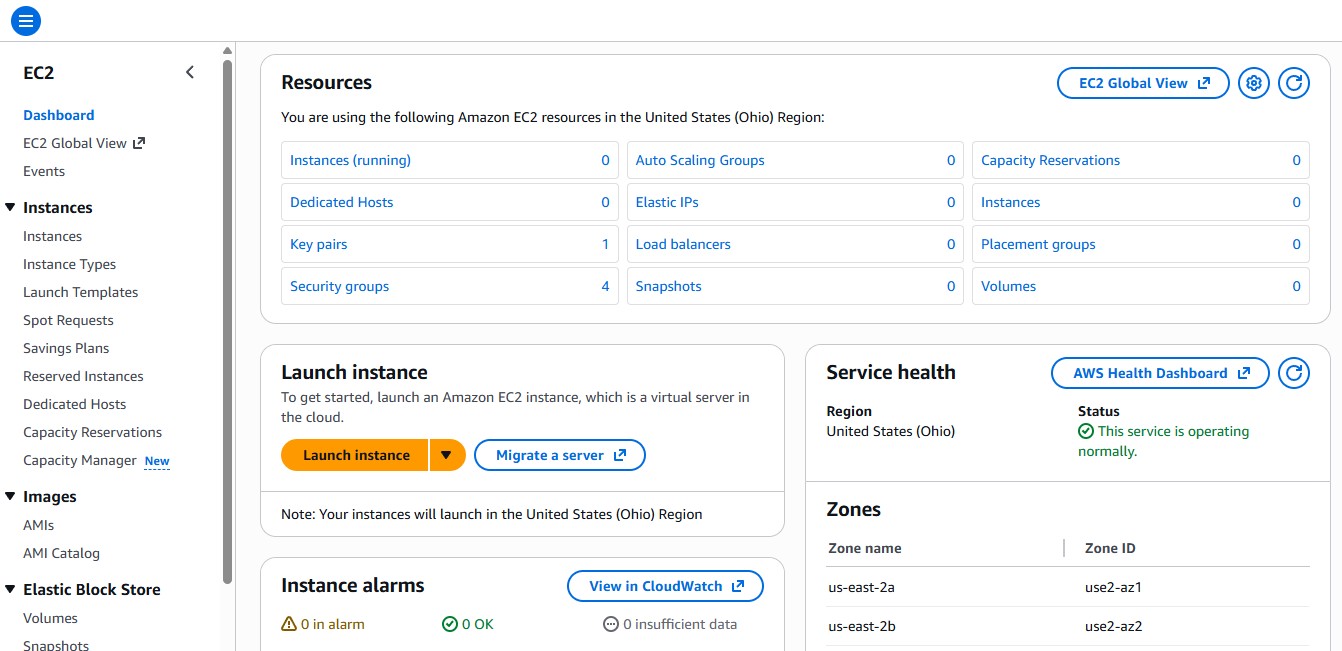
Let’s add some real-world context so we can gain a better understanding. I’ve logged into my personal AWS account, navigated to the EC2 page, and I see the following:
NOTE: Always exercise caution when experimenting with AWS. AWS is intentionally designed to make it very easy to scale to enterprise level capacity in minutes. This means the cost scales just as easily. If you aren’t careful, you could end up with a very expensive bill. Make sure you know what you are doing and set a budget to alert you of any unexpected costs before you are charged more than you can afford.
AWS EC2 Page
I currently have no EC2 instances in my account. Under the Resources section, 0 instances are shown in the “Instances (running)” section. If I wanted to create and launch an instance, I have two options.
- Click the Launch instance button from the EC2 page.
- Click the “instances (running)” link and click the “Launch instances” button from the Instances page.
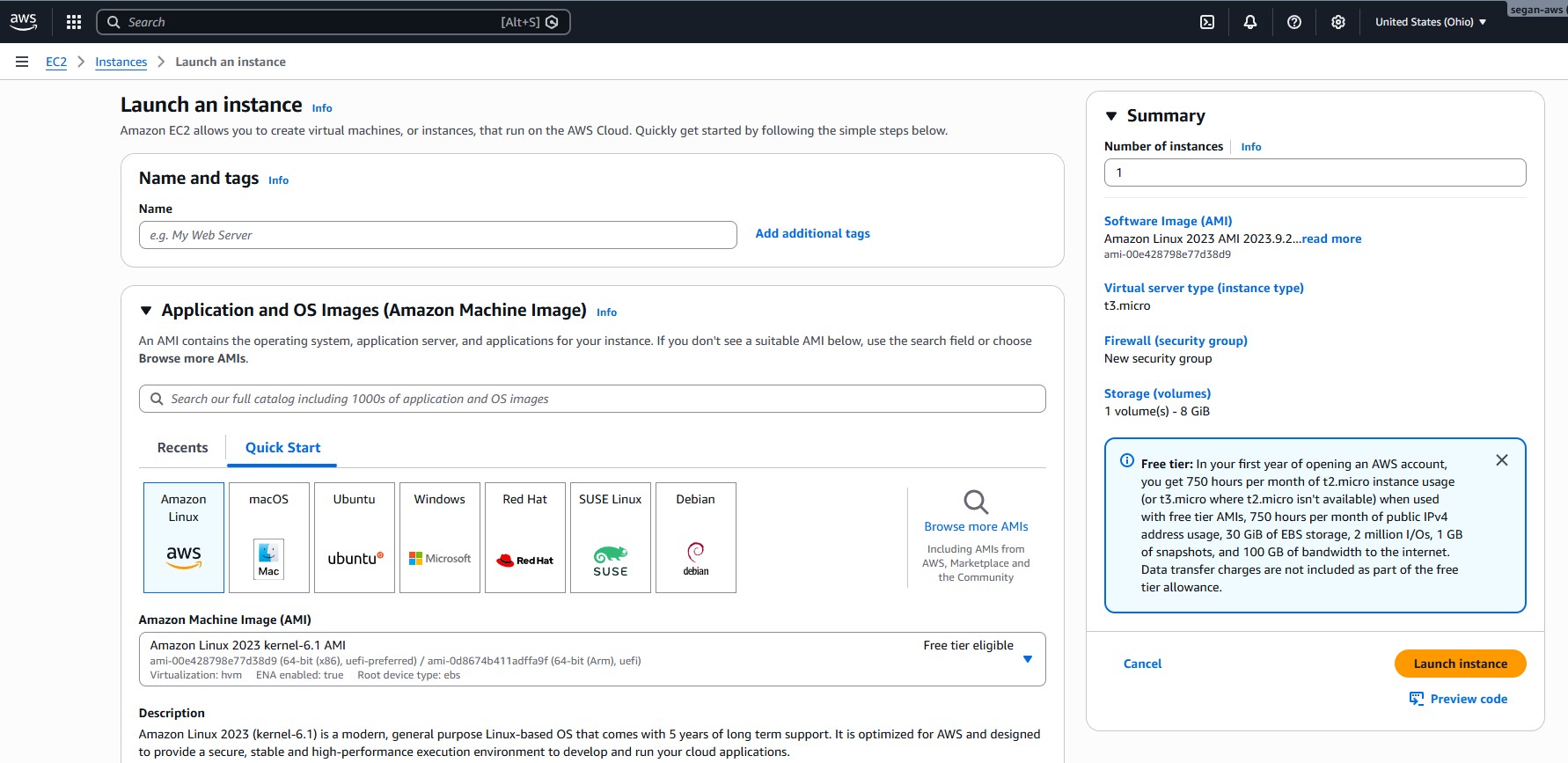
Both of these options navigate to EC2 > Instances > Launch an instance.
AWS EC2 > Instances > Launch an Instance Page
The instance type defaults to Amazon Linux.
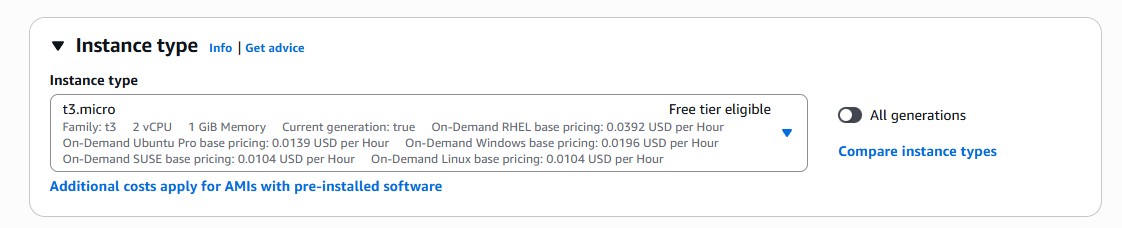
If we scroll down to the “Instance type” section, we can see the default is “t3.micro”,
The prices for a t3.micro instance are listed in the Instance type drop-down.
Instance Type Drop-Down
The following on-demand pricing is listed in the drop-down for a t3.micro EC2 instance:
RHEL: 0.0392 USD per hour Ubuntu Pro: 0.0139 USD per hour Windows: 0.0196 USD per hour SUSE: 0.0104 USD per hour Linux: 0.0104 USD per hour
Note the “Launch Instance” button in the lower-right corner. Clicking this button is what would trigger AWS to provision the instance and start billing me. I don’t want this right now, so I’m not going to click the button.
However, for the sake of example, let’s assume the following:
- I leave the EC2 configuration at the defaults, i.e., Amazon Linux and t3.micro
- I click the “Launch instance” button.
- The instance is launched.
- The instance runs for 10 seconds.
- I stop the instance.
In theory, I would be charged for 60 seconds of run time. At a cost of 0.0104 USD per hour, this would be a very small bill, but it’s an important detail to remember that on-demand instances charge for a minimum of 60 seconds.
The Amazon EC2 Reserved Instances page states: “Amazon EC2 Reserved Instances (RI) provide a significant discount (up to 72%) compared to On-Demand pricing and provide a capacity reservation when used in a specific Availability Zone.”
The concept of Reserved Instances is pretty straightforward and implied in the name. You reserve capacity for a period of time, obtaining a discount by doing so.
EC2 RIs provide a discounted hourly rate.
If an Availability Zone is specified when purchasing an RI, then EC2 reserves capacity matching the attributes of the RI.
If an RI is purchased scoped to a region, then the capacity reservation does not apply. Instead the RI’s discount is automatically applied to instance usage across AZs and instance sizes in a region.
There are two EC2 RI instance classes:
Standard RIs, which provide the most significant discount (up to 72% off).
Convertible RIs, which provide a discount (up to 66% off) and the capability to change the attributes of the RI, as long as the exchange results in the creation of Reserved Instances of equal or greater value.
Both classes of RIs are best suited for steady-state usage.
RIs are offered under three upfront payment options and can be shared between multiple accounts within a consolidated billing family.
The Amazon EC2 Spot Instances page states: “Amazon EC2 Spot Instances let you take advantage of unused EC2 capacity in the AWS cloud and are available at up to a 90% discount compared to On-Demand prices.”
Spot instances are best for stateless, fault-tolerant or flexible applications. Spot instances can be interrupted with a 2-minute warning, so your application using the spot instance needs to be able to handle this limitation.
Spot instances are best suited for things like big data & analytics, containerized workloads, high performance computing, web services, CI/CD & Testing, and Image Media & Rendering.
The key to remember for spot instances is that they offer a deep discount, up to 90%, but they can be interrupted, so they are best suited for fault-tolerant applications. A hypothetical example might be a fleet of servers that run a web service that reads from a read-optimized database and returns the results. An application that calls the web service can be designed to retry a call if the call fails. When a server in the fleet goes down during a read operation, the application can try again, connecting to another spot instance in the fleet.
The AWS Savings Plans page doesn’t really give a formal definition. For that, we have to go to the Savings Plans FAQs , which defines savings plans as "…a flexible pricing model offering lower prices compared to On-Demand pricing, in exchange for a specific usage commitment (measured in $/hour) for a one- or three-year period. AWS offers four types of Savings Plans – Compute Savings Plans, EC2 Instance Savings Plans, Database Savings Plans, and SageMaker Savings Plans. Compute Savings Plans apply to usage across Amazon EC2, AWS Lambda, and AWS Fargate."
Usage commitment for all types of savings plans is measured in $/hour.
As noted in the definition, there are four types of savings plans. However, Database and SageMaker Savings Plans are recent offerings and are not yet covered on the exam. For the AWS Certified Cloud Practitioner Exam, the focus should be on the two original core plans (Compute and EC2 Instance).
To know for the exam:
Compute Savings Plans
- Most flexible.
- Reduce costs up to 66%
- Automatically apply to EC2 instance usage regardless of instance family, size, AZ, region, OS or tenancy.
- Also apply to Fargate and Lambda usage.
EC2 Instance Savings Plans
- Provide the lowest prices.
- Reduce costs up to 72%.
- Require commitment to usage of individual instance families in a region.
- Automatically reduce cost on the selected instance family in that region, regardless of AZ, size, OS or tenancy.
To know about in general, but likely won’t be covered or should be disregarded for the CCP exam:
Database Savings Plans
- Offer savings on AWS database services in exchange for a commitment to a specific amount of usage over a 1-year term.
- Automatically apply to eligible serverless and provisioned instance usage, regardless of supported engine, instance family, size, deployment option, or AWS region.
SageMaker Savings Plans
- Offer a flexible pricing model for Amazon SageMaker.
- Can be purchased in a one-year or three-year term.
- Reduces SageMaker costs up to 64%.
This one is very straightforward, but in the spirit of consistency, here is how the AWS Dedicated Hosts page defines dedicated hosts: “Amazon EC2 Dedicated Hosts allow you to use your eligible software licenses from vendors such as Microsoft and Oracle on Amazon EC2, so that you get the flexibility and cost effectiveness of using your own licenses, but with the resiliency, simplicity and elasticity of AWS.”
An EC2 Dedicated Host is essentially a “bring your own license” model, allowing you to use existing operating system software licenses you’ve already paid for while maintaining compliance with the terms of the licensing.
Unlike many AWS offerings, which use virtualization, a dedicated host is a physical server.
Amazon EC2 Dedicated Host also integrates with AWS License Manager.
The AWS Dedicated Instances page defines dedicated instances as “Amazon EC2 instances that run in a VPC on hardware that’s dedicated to a single customer.”
Dedicated instances are physically isolated at the host hardware level from instances that belong to other AWS accounts.
At the bottom of the AWS Dedicated Hosts page is a chart comparing Dedicated Hosts to Dedicated Instances.
The differences to remember are:
- Both types enable the use of dedicated physical servers.
- Both allow automatic instance placement.
- Only Dedicated Hosts allow targeted instance placement.
- Dedicated Instances use per instance billing.
- Dedicated Hosts use per host billing.
- Dedicated Hosts are required to maintain compliance when using an existing license.
The final item in the AWS list of Compute Purchasing Options is Capacity Reservations.
A Capacity Reservation ensures that you have compute capacity (EC2) available in a specific Availability Zone.
A capacity reservation can start immediately or at a future date. The capacity becomes available for use only once the Capacity Reservation enters the active state.
Capacity Reservation charges on-demand rates, unless combined with savings plans or reserved instances.
- Savings plans automatically apply to reserved capacity.
- Reserved instances must be in the same Availability Zone as the capacity reservation to apply.
A key point to remember for the AWS CCP Exam is that, while Reserved Instances and Savings Plans guarantee discounts, Capacity Reservations guarantee availability. With a capacity reservation, you pay for the reserved capacity once provisioned.
Capacity reservations are for critical workloads where the capacity must launch when needed. Disaster recovery is a good use case. For example, an organization can purchase a capacity reservation for a specific AZ that is the target environment for disaster recovery. If the main infrastructure were to fail due to a catastrophe, a capacity reservation in the failover AZ would guarantee the capacity to run your EC2 instances would be available immediately.
AWS offers several flexible compute purchasing options: On-Demand, Reserved Instances, Spot Instances, AWS Savings Plans, Dedicated Hosts, and Capacity Reservations.
On-Demand Instances
- On-Demand Instances let you pay as you go, by the hour or second (minimum of 60 seconds), with no long-term commitment.
Reserved Instances
- Reserved Instances can be purchased scoped to an Availability Zone or a Region.
- Standard RIs offer the most significant discount (up to 72% off).
- Convertible RIs provide a discount of up to 66% off.
- Convertible RIs provide the capability to change the attributes of the RI, as long as the exchange results in the creation of Reserved Instances of equal or greater value.
- Both classes of RI (standard and convertible) are best for steady-state usage.
Spot Instances
- Spot Instances offer up to a 90% discount compared to on-demand prices.
- Spot Instances can be interrupted with a 2-minute warning.
- Spot Instances are best for fault-tolerant applications.
Savings Plans
Compute Savings Plans
- The current AWS CCP exam will cover two types of savings plans: Compute and EC2.
- Compute Savings Plans are the most flexible.
- Compute Savings Plans reduce costs up to 66%.
- Compute Savings Plans automatically apply to EC2 instance usage regardless of instance family, size, AZ, region, OS or tenancy.
- Compute Savings Plans also apply to Fargate and Lambda usage.
EC2 Instance Savings Plans
- Provide the lowest prices.
- Reduce costs up to 72%.
- Require commitment to usage of individual instance families in a region.
- Automatically reduce cost on the selected instance family in that region, regardless of AZ, size, OS or tenancy.
Dedicated Hosts
- Allow you to use your eligible vendor software licenses on Amazon EC2.
- A dedicated host is a physical server.
- Integrate with AWS License Manager.
- Use per host billing.
Dedicated Instances
- An instance that runs in a VPC on hardware that’s dedicated to a single customer.
- Physically isolated at the host hardware level from instances belonging to other AWS accounts.
- Use per instance billing.
Capacity Reservations
- Guarantee availability.
- Can start immediately or at a future date.
- Reserved instances must be in the same Availability Zone as the Capacity Reservation to apply.
That’s enough information to cover for one post. In part 2 of the series, we’ll look at Storage Options and Tiers. I’ll also be taking another practice test after publishing this post. I will post my updated score in part 2. If you’re reading this as study prep for the AWS CCP exam, I hope you found the information helpful and best of luck on the exam!